
Open Multiple Links Simultaneously in Browser
Paste a list of URLs and open them with a single click. A handy tool for testing, checking pages, or bulk opening websites.
Links for opening
Explore similar tools
Paste a list of URLs and open them with a single click. A handy tool for testing, checking pages, or bulk opening websites.
Allows you to instantly open dozens of URLs in the browser. This saves time and is convenient for SEO specialists, testers, and marketers.
Useful for analyzing sites, checking redirects, and comparing competitors' pages. Allows you to work with large amounts of data in a short time.
Does not require software installation, accessible from any device. Works in any browser and supports all popular operating systems.
Bulk link opener allows you to open multiple URLs at once in separate browser tabs.
Instead of opening each page manually:
paste a list of links
run the tool
all URLs open automatically
This saves time when working with a large number of pages.
Paste a list of URLs (one per line)
Click “Open links”
Allow pop-ups in your browser if required
Links will open in new tabs
If nothing opens, check the address bar — a pop-up blocking notification may appear.
Modern browsers restrict bulk tab opening to protect users from spam and malicious websites.
If you try to open many links at once, the browser may:
block some tabs
show a blocking notification
ask for permission
Opening 100+ tabs at once may freeze low-performance devices. It is recommended to open links in batches of 10–20 tabs.
Click the “Pop-up blocked” icon on the right side of the address bar and allow pop-ups for the site.
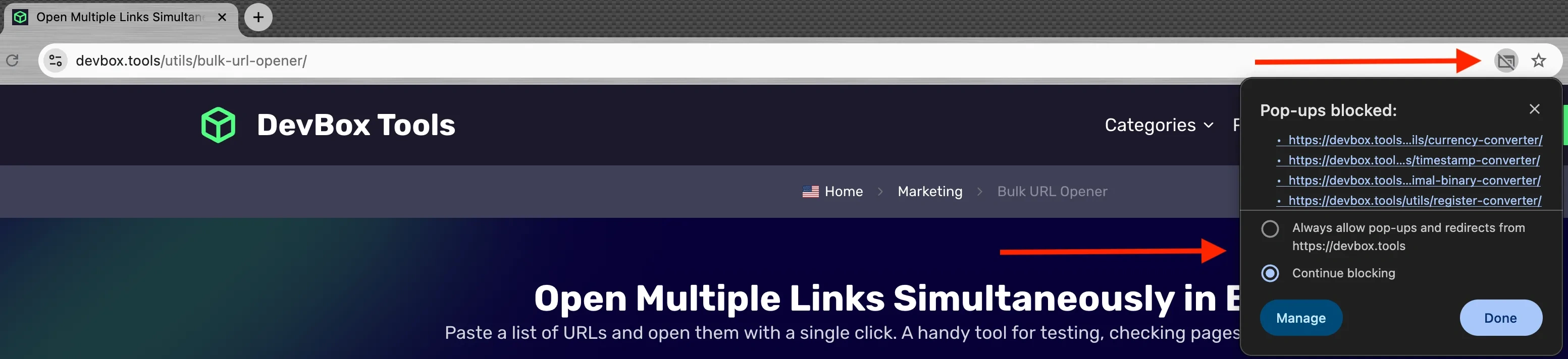
Click the website settings icon in the address bar and allow pop-ups for the site.

In the notification that appears, click “Preferences” and allow pop-ups for the site.
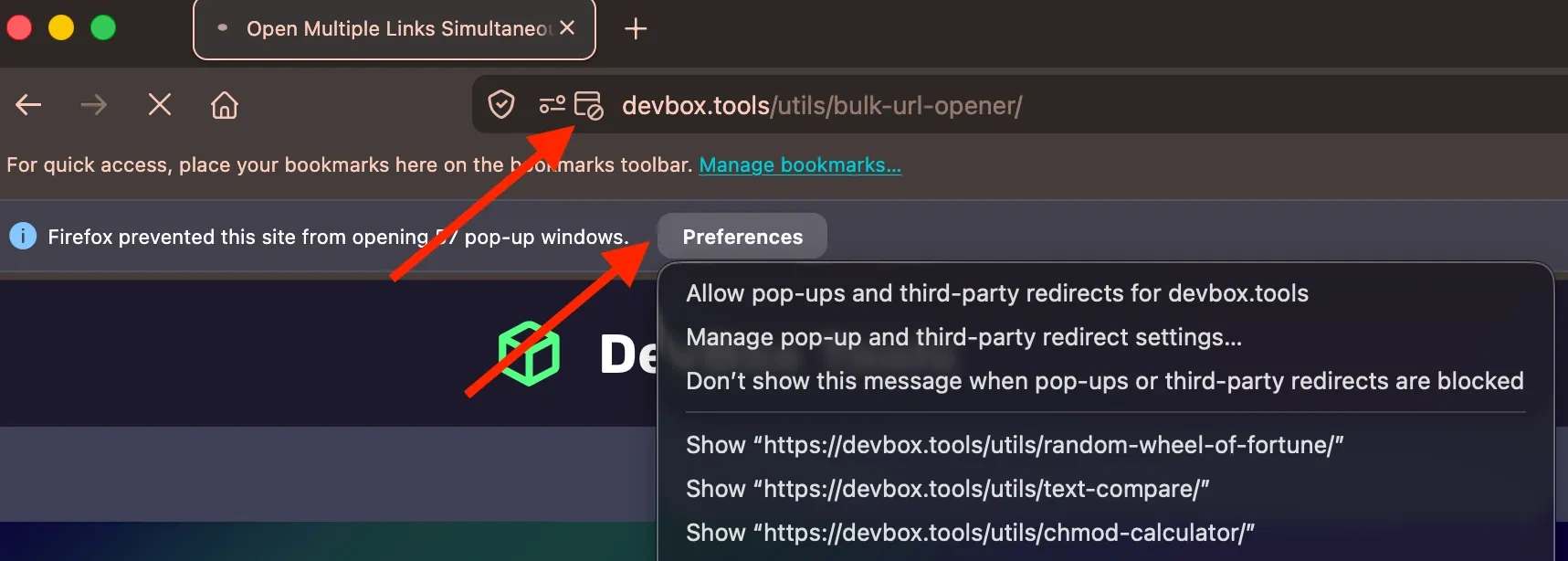
For efficient work with multiple tabs, use keyboard shortcuts:
Action | Windows / Linux (Chrome, Firefox, Edge) | macOS (Chrome, Safari, Firefox) |
|---|---|---|
Open new tab | Ctrl + T | Cmd + T |
Close current tab | Ctrl + W | Cmd + W |
Reopen closed tab | Ctrl + Shift + T | Cmd + Shift + T |
Switch to next tab | Ctrl + Tab | Ctrl + Tab |
Switch to previous tab | Ctrl + Shift + Tab | Ctrl + Shift + Tab |
Go to tab (1–8) | Ctrl + 1…8 | Cmd + 1…8 |
Go to last tab | Ctrl + 9 | Cmd + 9 |
Open link in new tab | Ctrl + Click | Cmd + Click |
Open link in new window | Shift + Click | Shift + Click |
Close all tabs | Ctrl + Shift + W | Cmd + Shift + W |
SEO and website analysis: competitor research, reviewing URLs from sitemaps
Content and editing: checking published pages, link validation, article review
Marketing: working with campaign URLs, checking landing pages, analyzing UTM links
Development and testing: page testing, QA before release
Opening unverified links in bulk may lead to malicious websites.
open only trusted links
avoid suspicious URLs
use antivirus software and browser protection tools

The tool for mass URL opening allows you to open several links in the browser at once, which simplifies the work of SEO specialists, testers, and marketers. It is especially useful for checking the correctness of pages, analyzing competitors, and monitoring multiple web resources simultaneously.
Simply paste the list of links, click the open button, and all pages will load automatically. This saves time by eliminating the need to manually copy and paste each link.
This service is easy to use, requires no software installation, and works entirely online. You can open hundreds of URLs simultaneously, making it an indispensable tool for web analysis.
A bulk URL opener allows you to open multiple URLs simultaneously in separate browser tabs. This is useful for checking multiple websites, comparing competitors, or quickly opening related resources.
The number depends on your browser's settings and system resources. Most browsers comfortably allow 10-20 tabs to be opened. Opening too many tabs simultaneously can slow down your browser.
You can enter URLs in various formats: with or without http/https protocols, as URI encoding, and as plain text. The tool will automatically format them correctly.
Yes, opening many tabs simultaneously can slow down your browser and consume a significant amount of RAM. Consider opening URLs in batches if you have a large list.
The tool performs basic validation of URLs to ensure correct formatting. Invalid URLs will be skipped to prevent browser errors.
Always exercise caution when opening URLs from unknown sources, regardless of the tool used. Malicious links can lead to phishing sites or malware downloads. Before bulk opening, ensure the reliability of the URLs.
The bulk URL opener itself does not check the status of websites. However, when opening tabs, you will immediately see which pages load correctly and which are unavailable.
If you try to open a large number of links at once, the browser may block some tabs as pop-ups. This is a standard protection mechanism against unwanted pop-ups. In this case, a notification will appear asking you to allow the tabs to open. To correctly open all links, confirm permission or add the site to the exceptions list in the browser settings.